Times Tables - Multiplication
- 4.5
- Rating
- 1.00M
- Installs
- Free
- Price
 Analysis by App-foxy
Learning multiplication can feel very different depending on whether a child is practising willingly or being asked to repeat tables from a worksheet. I found Times Tables - Multiplication most useful in the first situation: it turns short bursts of arithmetic practice into a game-like activity without making the subject feel quite so formal. It is an educational game from BrainSoft Apps, aimed at children who need regular work on multiplication and division.
The central decision is not simply whether the game is enjoyable. It is whether a child needs a focused times-table tool, whether they can work independently, and whether a parent or teacher wants a quick practice option rather than a complete mathematics course. In my experience, this app makes the most sense as a repeatable practice companion. It is not a replacement for explanation, pencil-and-paper work, or help from an adult when a child does not understand why an answer is correct.
What I considered before recommending it
I looked at four practical questions: how narrowly the game focuses on multiplication and division, how easy it is to fit into an everyday routine, whether the activities support genuine recall rather than random tapping, and how much value it offers compared with ordinary alternatives. Those questions matter because a child may enjoy a maths game for a few minutes but still avoid the tables they find difficult.
You May Also Like

 Blood Strike: 2.5 Anniversary
Blood Strike’s Loadouts Turn Every Drop Into a Tactical Gamble
A close look at Blood Strike’s custom loadouts: how fast access to signature weapons reshapes its battle royale rhythm, rewards preparation, and narrows the gap between fights.

 Pandora - Music & Podcasts
Pandora’s Music Is Easy to Start, but Harder to Recover
Pandora’s strength is its low-effort path from a seed to a station. Its weak spot is how much confidence it asks you to place in connection, setup, and quiet recovery.

 8 Ball Pool
 Is Built on Rivalries, Rematches, and Routine
A close look at the rivalries, rematches, shared routines, and unanswered safety questions that turn a quick pool match into a persistent mobile community.

 Samsung Music
’s Quiet Strength Is Playing What You Already Own
Its reach comes less from spectacle than from dependable access to a personal library. That simplicity is both the app’s strongest retention engine and its ceiling.

 AccuWeather: Weather Radar
AccuWeather Review: A Quick, Clear Forecast for Everyday Decisions
For everyday plans, the best forecast is the one you can understand quickly. AccuWeather makes rain timing, radar, and local conditions easy to act on, with a few trade-offs.

 Hill Climb Racing
Why Hill Climb Racing Still Turns Crashes Into One More Run
A tiny car, a bumpy hill and one more upgrade: Hill Climb Racing keeps resurfacing because its simple chaos makes every near-miss feel personal.
More From Our News Desk



The app is free to start, with optional in-app purchases ranging from $0.99 to $19.99 per item. That makes it easy to try without committing money immediately, although families should still pay attention to purchase prompts if a child uses the device alone. Its Everyone content rating also makes it suitable for a broad family audience, while the minimum operating-system requirement of Android 6.0 means it can work on some older devices as well.
I also paid attention to the difference between recognition and mastery. A child can sometimes guess a familiar-looking answer inside a game without being able to recall it later at school. For that reason, I would judge this app by whether it encourages repeated contact with tables over several days, not by whether one short session feels successful.
How it fits into a normal day
A realistic use case is a child who has ten minutes before dinner or while waiting for an appointment. Instead of opening a broad game and losing the whole break to it, they can use that small window for multiplication practice. I would suggest keeping the session short and consistent. A child who struggles with the seven or eight times tables may benefit more from several calm sessions during the week than from one long session that ends in frustration.
For parents, the useful workflow is simple: choose a regular moment, let the child practise, and then ask them to explain one or two answers aloud. That last step is important. The game can create repetition, but a quick spoken explanation helps reveal whether the child understands multiplication as groups, repeated addition, or a related division fact.
Teachers could also use it as an optional activity after assigned work, especially for pupils who finish early and need extra table practice. I would not use it as the only classroom method, because children still need written calculations, word problems, and opportunities to compare different solution methods.
Where the focused format works best
The strongest part of Times Tables - Multiplication is its narrow purpose. Children are not sent through a large collection of unrelated subjects before reaching the arithmetic they need. That focus can be helpful when the immediate goal is memorising multiplication facts and becoming more comfortable with division.
This is particularly useful for a child who knows the ideas but hesitates when recalling facts. Repeated game-based questions can make the process less intimidating than a timed worksheet. I also like the possibility of using it as a warm-up before homework: a few questions can get multiplication into the child’s mind before they face written exercises.
Another advantage is that the app can make practice feel more private. Some children become anxious when an adult watches every answer or corrects every mistake. A game gives them room to attempt questions independently. I would still check in afterwards, but I would avoid turning each session into a test.
The title’s emphasis on times tables also makes the product easier to understand than a broad educational app with many competing activities. If a parent is specifically searching for multiplication practice, the purpose is immediately clear. The store short description is simply “Times Tables,” and that directness matches the way I would use it: open it when tables are the task, rather than expecting it to cover all of mathematics.
Small habits that improve the results
One useful approach is to keep a paper note nearby and write down the facts that cause hesitation. The point is not to copy every question. It is to notice patterns, such as confusing six times seven with seven times seven or knowing multiplication but forgetting the related division fact. After a session, I would practise only those weak points away from the screen.
A second approach is to alternate app practice with real objects. For example, a child can arrange buttons or blocks into equal rows after working on a table. This connects fast recall with the meaning of multiplication. It also prevents the app from becoming a purely visual reaction exercise.
A third tip is to ask the child to predict the answer before tapping. Even if the game presents questions quickly, pausing for a mental estimate changes the activity from guessing into deliberate recall. For division, I would ask the child to reverse the fact: if they see a division question, can they name the multiplication sentence that proves the answer?
These habits are not extra decoration. They address the main weakness of any narrow practice game: repeated correct responses do not automatically produce flexible mathematical thinking. The app is more valuable when it sits inside a routine that includes talking, writing, and applying the facts.
What the experience feels like for different learners
Children who enjoy short challenges and immediate interaction are likely to respond well. The game format can lower the barrier to starting, especially for a child who regularly says that maths is boring. It may also suit learners who need frequent repetition but dislike seeing the same material presented as a worksheet.
However, not every learner benefits from game-style practice. A child who becomes upset by mistakes may need an adult nearby to keep the activity encouraging. A child who already knows the tables confidently may find the narrow focus repetitive and may be better served by a broader maths game involving fractions, geometry, measurement, or problem solving.
I would also be careful with children who need a slower explanation of the underlying concepts. If a learner is still unsure what multiplication represents, sending them straight into repeated questions can reinforce confusion. In that case, I would teach the concept with objects, drawings, or a teacher’s explanation first, then use the app for reinforcement.
How it compares with familiar alternatives
The usual alternative is a printed times-table sheet. Paper is better when a child needs to show working, circle uncertain facts, or review mistakes in a visible way. It is also easier for an adult to see exactly where the difficulty lies. The app is more inviting for repeated short practice and may be easier to start when a worksheet feels like extra homework.
Flashcards offer another comparison. They are quick, portable, and excellent for family practice, but they depend on someone presenting the cards or on the child organising them. Times Tables - Multiplication provides a more independent option. On the other hand, flashcards make it easy to separate known facts from uncertain ones, while a game may keep the learner moving without encouraging that kind of sorting.
Broader mathematics apps can be a better choice for children who need variety. They may cover several areas and help prevent boredom, but that wider scope can dilute a specific goal. If the immediate problem is weak multiplication recall, I would rather use a focused tool consistently than open a large app and hope the right activity is chosen.
One-to-one teaching remains the better alternative when a child repeatedly gets the same concept wrong. An adult can ask what the child was thinking, change the explanation, and spot issues that a practice game cannot address. The trade-off is time and availability. This app cannot replace that support, but it can reduce the amount of repetitive drilling an adult has to lead.
Limits worth considering before installing
The focused design can become a limitation. A child who wants a complete learning path may outgrow it once basic tables are secure. I would not choose it as a single mathematics resource for a full school year, because multiplication and division are only part of what children need to learn.
There is also a difference between being entertained and being challenged appropriately. If a child keeps selecting questions they already know, the activity may feel successful without improving weaker facts. Parents should occasionally ask what was difficult and guide practice toward the gaps rather than judging progress by enthusiasm alone.
The free entry point is convenient, but optional purchases mean the app is not necessarily a completely cost-free experience in practice. I would let an adult handle any purchase decisions and check the device’s purchase protections. The range from $0.99 to $19.99 per item is broad enough that families should not assume every part of the experience has the same cost.
Another limitation is that screen practice does not automatically transfer to written work. A child may answer quickly inside the game but still need help setting out a multiplication calculation or solving a word problem. I would always pair the app with occasional offline questions to check whether the skill travels beyond the screen.
Who should choose it, and who should skip it
I would recommend it to parents looking for a dedicated way to practise multiplication and division with a primary-school child, particularly when worksheets are met with resistance. It is also a sensible option for short home sessions, informal revision, or an extra activity after regular homework.
I would be more cautious if the child needs detailed teaching, has significant maths anxiety, or is looking for advanced topics. In those cases, an app with explanations, adaptive instruction, or a broader curriculum may be a better first choice. I would also skip it as the main option for a child who already recalls tables easily and needs richer problem solving instead.
The audience size suggests that the format has broad appeal: it has passed one million installs and holds a 4.5 average from roughly thirteen thousand ratings. Those figures do not decide whether it suits one particular child, but they do make it a reasonably established choice rather than an obscure experiment.
Practical details and long-term value
BrainSoft Apps released the game on March 30, 2021, and the current version is 2.4.8. I would keep the app updated where the device allows it, particularly if a family relies on it regularly. Its age rating of Everyone is reassuring for shared family use, though adults should still set expectations around screen time and purchases.
The best value comes from using it as part of a planned routine rather than leaving it available as an unstructured distraction. For example, a parent might choose three practice days, ask the child to name one difficult fact after each session, and review those facts on paper at the weekend. That turns a simple game into a small learning system with a clear purpose.
I also like the fact that the price barrier is low enough to test the fit first. A child’s reaction matters more than a description: some will enjoy the repeated focus, while others will quickly ask for more variety. Starting with the free option lets a family observe that response before considering any optional purchase.
My recommendation
My recommendation is positive, with a clear boundary: use Times Tables - Multiplication as a focused practice tool, not as a complete maths teacher. I would choose it for a child who needs more repetition, prefers interactive activities, and can benefit from short independent sessions. I would combine it with explanations, written work, and everyday examples so that fast answers become usable knowledge.
The deciding question is whether your child needs more practice or more teaching. If practice is the missing piece, this game offers an approachable way to return to multiplication and division regularly. If understanding is the missing piece, start with a person, a lesson, or physical examples and bring the app in afterwards.
For families comparing it with worksheets, flashcards, or broad maths apps, I see it as the focused middle option: more engaging than plain repetition, more specific than a large educational suite, but less flexible than a teacher and less useful for wider mathematical reasoning. That balance makes it worth trying for the right learner, especially when a few minutes of voluntary practice are easier to achieve than another formal exercise.
After using it, I would keep the routine simple, watch for recurring mistakes, and stop before the child becomes frustrated. With that approach, the game can make table practice less of a daily argument while still leaving room for the deeper learning that happens away from the screen.
FAQs for Times Tables - Multiplication
01What is Times Tables - Multiplication, and who is it designed for?
Times Tables - Multiplication is an educational app focused on helping children and beginners learn, practice, and memorize multiplication tables. It typically combines lessons, quizzes, timed challenges, and interactive exercises to make repetition more engaging. The app is most suitable for elementary-school students, although parents, teachers, and anyone needing extra multiplication practice may also find it useful.
02Which multiplication tables can users practice in the app?
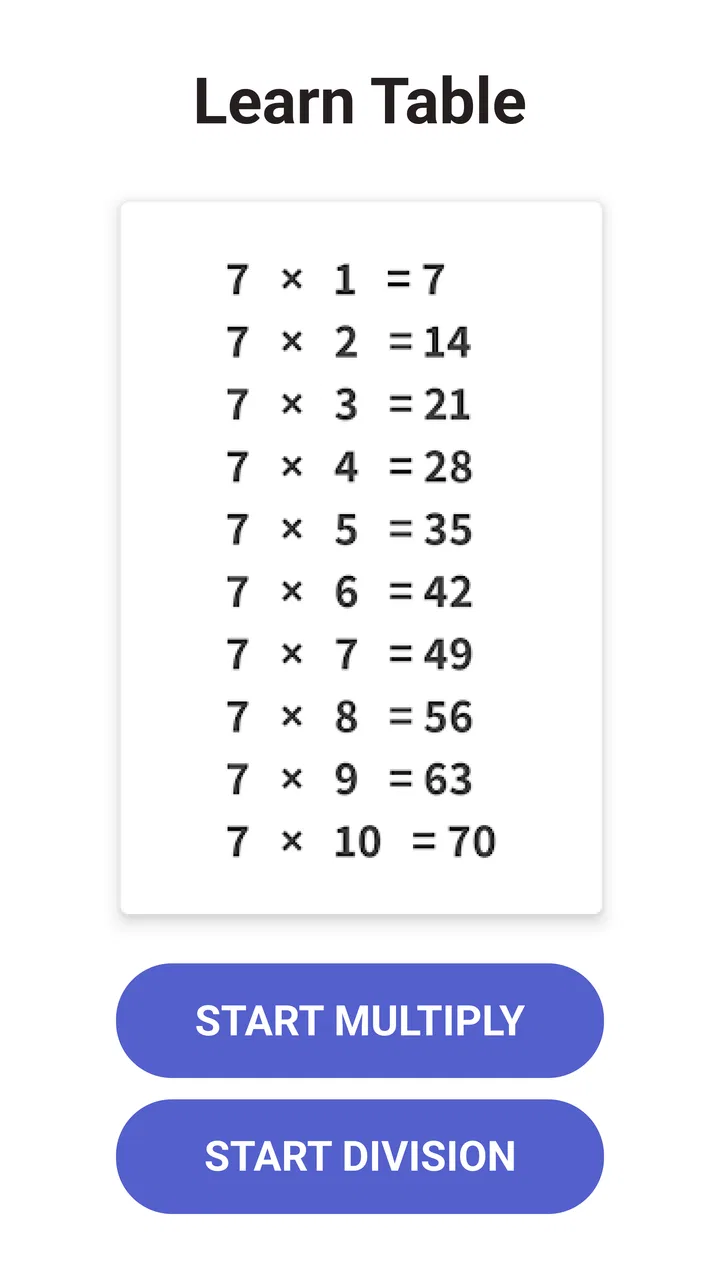
The app generally allows users to practice a range of multiplication tables, commonly from 1 through 10 or 12, depending on the selected activity and version. Learners can often choose individual tables for focused practice or combine several tables for a more challenging quiz. This makes it possible to begin with easier facts and gradually progress toward mixed multiplication exercises.
03Does Times Tables - Multiplication work without an internet connection?
Many of the core learning activities in Times Tables - Multiplication can usually be accessed offline after the app has been installed, which is convenient for homework, travel, or practice away from Wi-Fi. However, certain features may require an internet connection, including advertisements, analytics, online rankings, updates, or purchases. Availability can vary by device and app version.
04Is the app suitable for young children, and does it contain advertisements or in-app purchases?
Times Tables - Multiplication is designed with children and early learners in mind, using simple controls and short practice sessions. Before downloading, parents should review the store listing for the current age rating, advertising policy, and purchase options. Some versions may include ads or optional paid features, so parental controls and purchase restrictions are recommended for younger users.
05How does the app help children improve their multiplication skills?
The app supports improvement through repeated practice, immediate feedback, and exercises that encourage faster and more accurate answers. Learners can usually start with one table, review mistakes, and then move to mixed or timed challenges as their confidence grows. It works best as a regular practice tool alongside classroom instruction, written exercises, and guidance from a parent or teacher.
Pros
- Clear multiplication tables make practice easy for beginners.
- Short quizzes help children build faster recall over time.
- Simple controls are suitable for younger users.
- Useful for quick practice sessions at home or school.
- Works well as a supplement to regular math lessons.
Cons
- Content may feel repetitive after extended use.
- Limited value for learners beyond basic multiplication.
- Some children may need parental guidance to stay motivated.
- Practice can become stressful if timed challenges are included.
- The learning experience may lack deeper math explanations.

Times Tables - Multiplication
Gallery